> ## Documentation Index
> Fetch the complete documentation index at: https://help.clueso.io/llms.txt
> Use this file to discover all available pages before exploring further.
# Translate
> Translate your project into another language with Clueso
In this guide, you'll learn how to translate your entire Clueso project (video and article) from one language into another.
Click on the **Translate** button.
Search for the language you want your project in, and click **Translate** to begin converting your project.
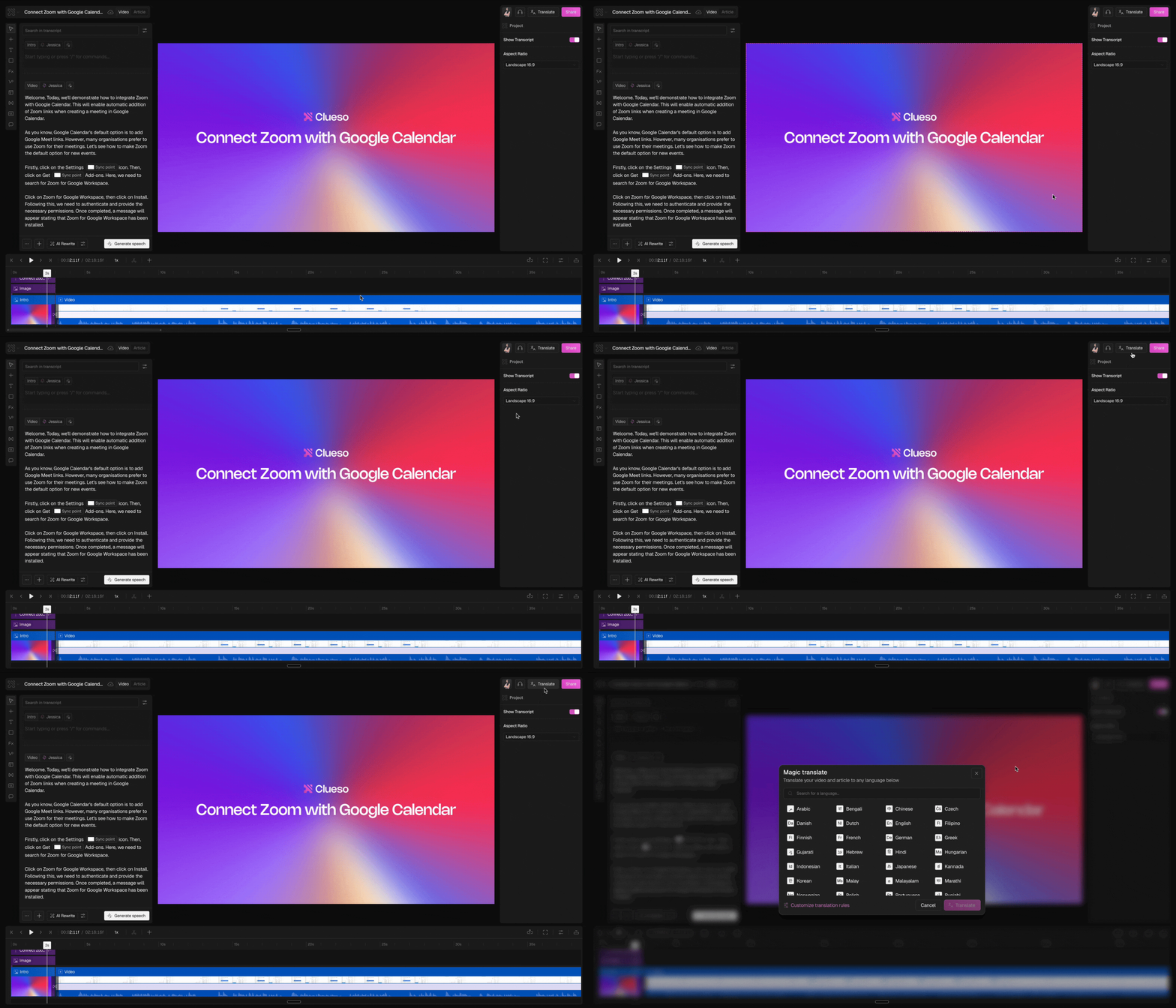 Clueso will create a translated copy of your project in a new browser tab. Both the video script and the article text will appear in the language you selected.
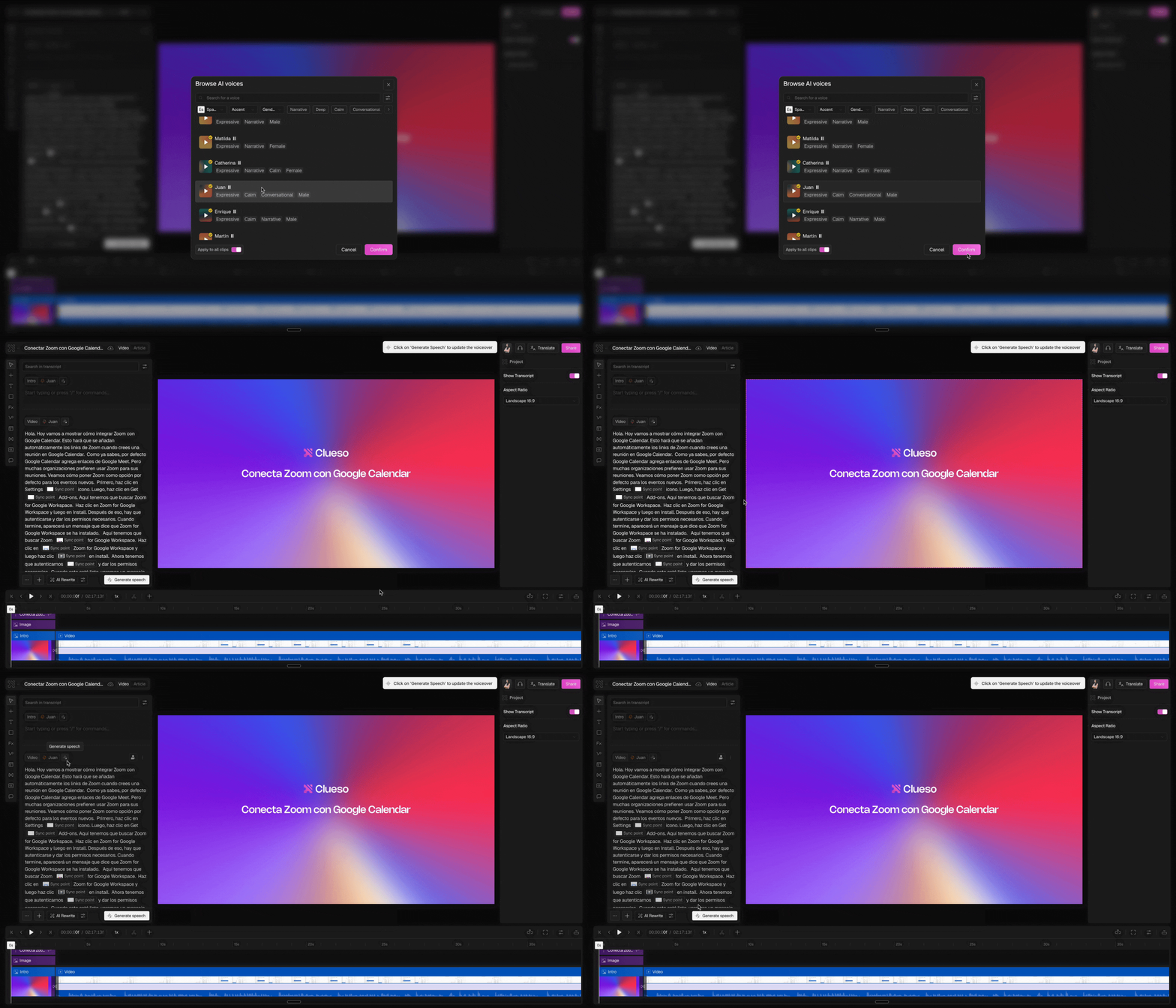
Choose a voice in that language and click **Generate Speech** to produce your voiceover. Once generated, your translated project is ready to share.
Clueso will create a translated copy of your project in a new browser tab. Both the video script and the article text will appear in the language you selected.
Choose a voice in that language and click **Generate Speech** to produce your voiceover. Once generated, your translated project is ready to share.
 Here’s the full list of languages we now offer:
**Europe:** \
🇬🇧 English (UK), 🇨🇿 Czech, 🇩🇰 Danish, 🇳🇱 Dutch, 🇫🇮 Finnish, 🇫🇷 French, 🇩🇪 German, 🇬🇷 Greek, 🇭🇺 Hungarian, 🇮🇹 Italian, 🇳🇴 Norwegian, 🇵🇱 Polish, 🇵🇹 Portuguese, 🇷🇺 Russian, 🇪🇸 Spanish, 🇸🇪 Swedish, 🇺🇦 Ukrainian\
\
**Americas:** \
🇺🇸 English (US), 🇪🇸 Spanish (Latam), 🇧🇷 Portuguese (Brazil), 🇨🇦 French (Canada)\
\
**Asia:** \
🇨🇳 Chinese, 🇵🇭 Filipino, 🇮🇩 Indonesian, 🇯🇵 Japanese, 🇰🇷 Korean, 🇲🇾 Malay, 🇹🇭 Thai, 🇻🇳 Vietnamese\
\
**India:** \
🇮🇳 Bengali, 🇮🇳 Gujarati, 🇮🇳 Hindi, 🇮🇳 Kannada, 🇮🇳 Malayalam, 🇮🇳 Marathi, 🇮🇳 Punjabi, 🇮🇳 Tamil, 🇮🇳 Telugu\
\
**Middle East:** \
🇦🇪 Arabic, 🇮🇱 Hebrew, 🇹🇷 Turkish
If you’re looking to localize your content into any of these languages, Clueso has you covered.
## FAQs
No. If you try to select a voice in another language without translating your script first, the speech generation will fail. To generate audio correctly in another language, you must first click the **Translate** button to convert your script.
No. When you translate, Clueso creates a new copy of your project in a separate tab. Your original project remains unchanged.
Yes. After translation, you can review and edit the script just like you would in your original project. This is useful if you want to fine-tune specific phrases or adjust tone.
Yes. Once your project is translated, you’ll need to select a voice in the target language and click Generate Speech to produce the new voiceover.
Here’s the full list of languages we now offer:
**Europe:** \
🇬🇧 English (UK), 🇨🇿 Czech, 🇩🇰 Danish, 🇳🇱 Dutch, 🇫🇮 Finnish, 🇫🇷 French, 🇩🇪 German, 🇬🇷 Greek, 🇭🇺 Hungarian, 🇮🇹 Italian, 🇳🇴 Norwegian, 🇵🇱 Polish, 🇵🇹 Portuguese, 🇷🇺 Russian, 🇪🇸 Spanish, 🇸🇪 Swedish, 🇺🇦 Ukrainian\
\
**Americas:** \
🇺🇸 English (US), 🇪🇸 Spanish (Latam), 🇧🇷 Portuguese (Brazil), 🇨🇦 French (Canada)\
\
**Asia:** \
🇨🇳 Chinese, 🇵🇭 Filipino, 🇮🇩 Indonesian, 🇯🇵 Japanese, 🇰🇷 Korean, 🇲🇾 Malay, 🇹🇭 Thai, 🇻🇳 Vietnamese\
\
**India:** \
🇮🇳 Bengali, 🇮🇳 Gujarati, 🇮🇳 Hindi, 🇮🇳 Kannada, 🇮🇳 Malayalam, 🇮🇳 Marathi, 🇮🇳 Punjabi, 🇮🇳 Tamil, 🇮🇳 Telugu\
\
**Middle East:** \
🇦🇪 Arabic, 🇮🇱 Hebrew, 🇹🇷 Turkish
If you’re looking to localize your content into any of these languages, Clueso has you covered.
## FAQs
No. If you try to select a voice in another language without translating your script first, the speech generation will fail. To generate audio correctly in another language, you must first click the **Translate** button to convert your script.
No. When you translate, Clueso creates a new copy of your project in a separate tab. Your original project remains unchanged.
Yes. After translation, you can review and edit the script just like you would in your original project. This is useful if you want to fine-tune specific phrases or adjust tone.
Yes. Once your project is translated, you’ll need to select a voice in the target language and click Generate Speech to produce the new voiceover.