> ## Documentation Index
> Fetch the complete documentation index at: https://help.clueso.io/llms.txt
> Use this file to discover all available pages before exploring further.
# Copy a project to a workspace
> Move an existing project to a different workspace in Clueso.
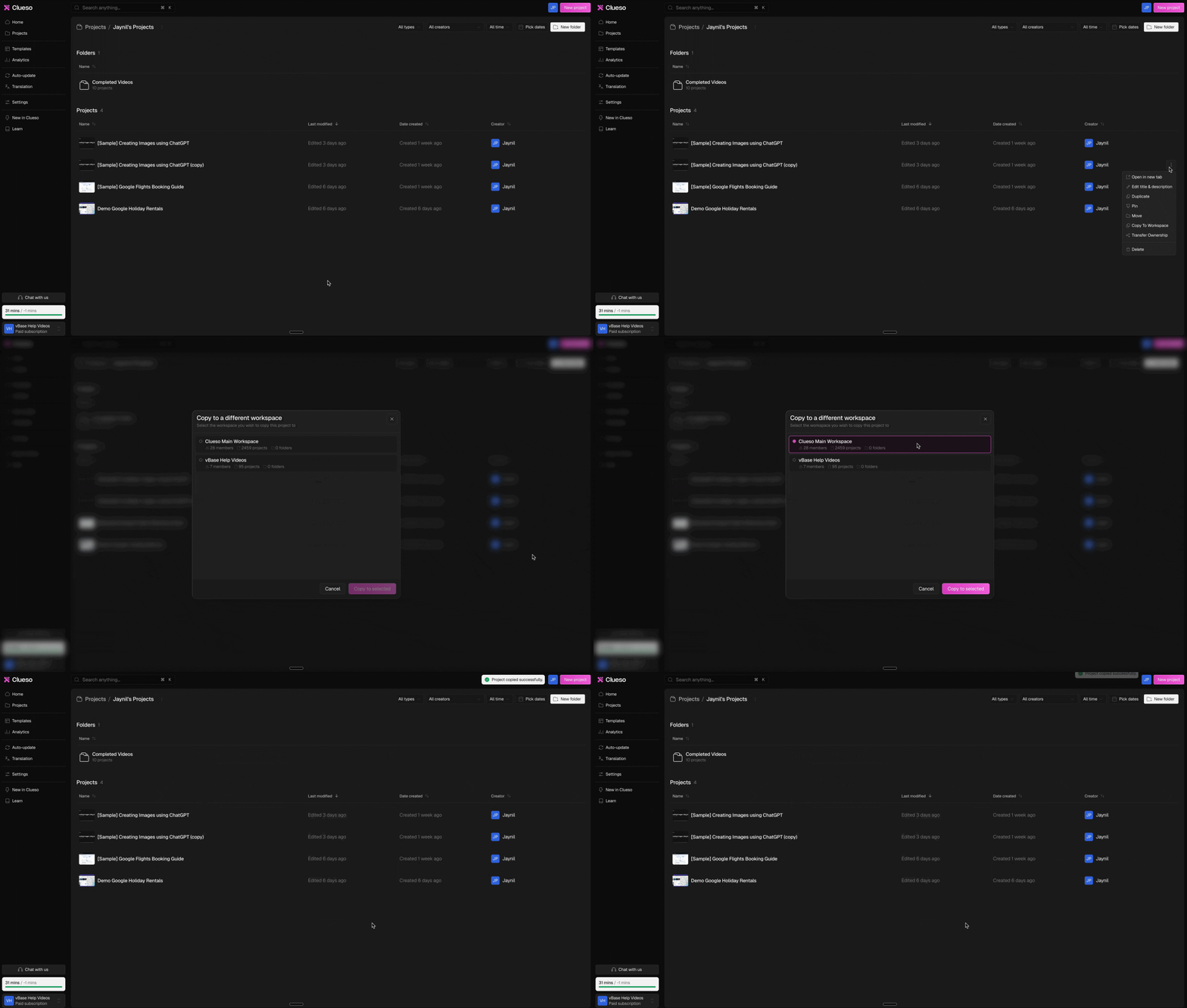
Use these steps to move a project to another workspace:
Go to [Home > Projects](https://web.clueso.io/home/folders/Collection_root).
For the project that you want to move, click on the **three-dot menu.**
Select **Copy To Workspace**.
Now, **choose the workspace** where you want to move the project to and click on **Copy to selected.**
 ### Can't find the workspace you're looking for?
You’ll only see workspaces that you’re a member of, and only those hosted in the same region as your account.
If you still can’t find your workspace, or need details about the region where your data is hosted, contact [**support@clueso.io**](mailto:support@clueso.io).
### Can't find the workspace you're looking for?
You’ll only see workspaces that you’re a member of, and only those hosted in the same region as your account.
If you still can’t find your workspace, or need details about the region where your data is hosted, contact [**support@clueso.io**](mailto:support@clueso.io).